Building a YouTube channel often feels like shouting into a void. You spend hours filming, editing, and perfect-tuning a video, only to watch it sit at 12 views. The truth is, raw talent isn’t always enough to win over the YouTube algorithm—you need data.
After using TubeBuddy across multiple channels to map out search patterns and reverse-engineer what makes a video take off, I want to share a transparent, ground-level look at what this tool actually does, how it operates, and whether it’s worth your hard-earned money.
What is TubeBuddy?
At its core, TubeBuddy is a browser extension (available for Chrome, Firefox, and Edge) that embeds itself straight into your existing YouTube dashboard. Instead of forcing you to navigate to an external website or secondary software, it integrates natively. Once installed, it retrofits your regular creator studio with an analytical overlay, deep-dive keyword tools, and bulk-processing menus.
It is 100% YouTube Certified, meaning it complies directly with YouTube’s terms of service. You don’t have to worry about risking your channel status by using it.
The Features That Actually Matter
TubeBuddy packs over 60 individual features, but honestly, you’ll likely spend 90% of your time using just a handful of high-impact tools. Let’s break down the heavy hitters that move the needle.
1. The Keyword Explorer & SEO Studio
YouTube is the world’s second-largest search engine. If you want organic traffic, you need to target phrases people are actively typing.
- How it works: You type a rough topic idea into the Explorer, and it scores the phrase based on search volume, competition, and how well your specific channel can realistically rank for it.
- The Strategy: It stops you from blindly targeting hyper-competitive terms like “travel vlog” and points you toward specific, underserved niches (e.g., “solo budget travel guide Kyoto”) where your content can actually stand out.
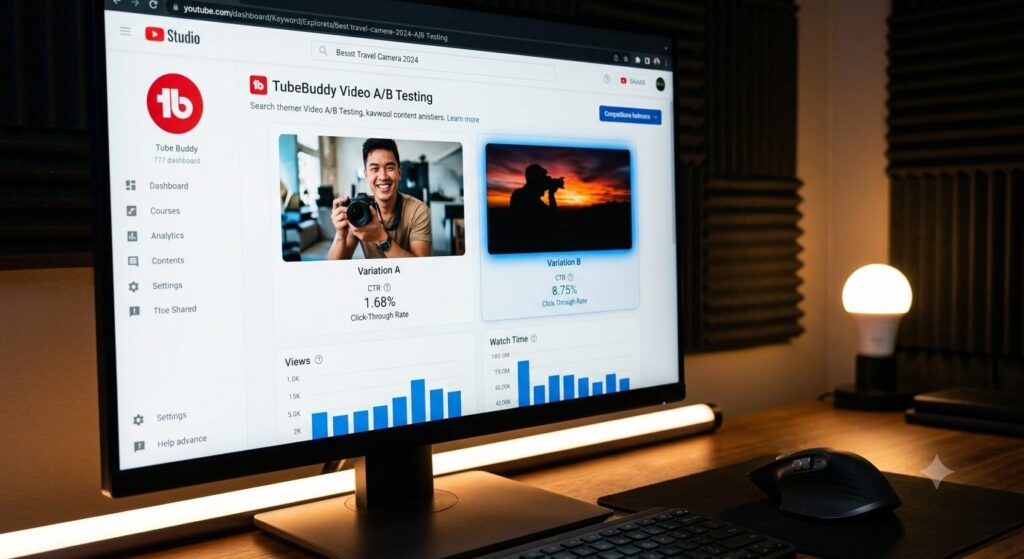
2. Video A/B Testing (The Game Changer)
Your thumbnail and title are the front door to your video. If your Click-Through Rate (CTR)—the percentage of people who see your thumbnail and choose to click it—is low, YouTube stops recommending your content.
- TubeBuddy’s higher-tier plans allow you to upload two different thumbnails or titles for a single video.
- The tool automatically swaps them back and forth every 24 hours, measures the analytical performance, and tells you exactly which variant pulled in more views.
3. Bulk Processing
As your library grows to dozens or hundreds of videos, updating old content becomes an absolute nightmare. If you sign a new sponsor, launch a product, or update social media handles, manually pasting links into every description can take days.
- With Bulk Processing, you can find a specific line of text or a card across your entire library and replace, add, or delete it across all videos simultaneously in less than two minutes.
Choosing a Plan: Tier Breakdown
TubeBuddy offers a robust free tier that lets you try out basic keyword features and upload checklists. However, serious channel scaling usually requires upgrading.
- Free: Best for beginners getting their footing. Gives basic upload checklists and limited keyword insights.
- Pro ($9/month): Best for emerging creators. Bonus: TubeBuddy offers a 50% discount if you have under 1,000 subscribers, bringing it down to just $4.50/month. It unlocks unlimited access to the Keyword Explorer and Suggested Tags.
- Star ($19/month): Best for growing channels managing a large content library. It grants full access to time-saving bulk processing tools.
- Legend ($49/month): Best for full-time creators looking to maximize revenue. This tier unlocks live Video A/B testing and automated title translation to reach international markets.
The Alternative: TubeBuddy vs. VidIQ

If you’ve looked into YouTube optimization, you’ve undoubtedly run across VidIQ. Both are incredible platforms, but they cater to slightly different workflows:
- TubeBuddy shines brightest when it comes to on-page productivity, channel management shortcuts, offline deep-dives, and thumbnail testing.
- VidIQ leans heavily into real-time trend tracking, competitor velocity alerts, and slick web-app interfaces.
Many creators actually use the free versions of both simultaneously. However, if you are forced to pick a single premium ecosystem to invest your money into, TubeBuddy offers more raw utility for managing your day-to-day upload workflows and physical channel infrastructure.
Frequently Asked Questions
Is the free extension enough to start?
Absolutely. The free extension gives you a clear look at competitor tags, basic keyword suggestions, and an optimization checklist that ensures you don’t miss essential steps (like adding cards or end screens) when publishing.
Can I use one license for multiple channels?
Licenses are bound on a per-channel basis. If you run three separate channels, you will need to purchase separate plans for each, though TubeBuddy does offer multi-channel discounts if you contact their support team.
Will it instantly make my videos go viral?
No tool can fix an unengaging video or a poor script. TubeBuddy isn’t a magic button; it is a diagnostic kit. It ensures that when you do make a fantastic video, it has the absolute best chance of being discovered, categorized correctly, and clicked by the right audience.
Related Reading & Resources
Explore more guides on Pizario:
External resources: